
How to track custom bakery orders and deposits
Short answer: keep one row per order with the customer, the pickup date, the order total, the deposit you asked for and what has been paid. The balance is the total minus what was paid. Each week, look at the open orders by date and collect each balance at pickup.
When orders arrive by message, phone and in person, the details end up in different places. One list with the same columns for every order fixes most of it: you can see who still owes money, what is due this week and what is missing.
What to record for every order
- Customer and how to reach them.
- Pickup or delivery date and time.
- Items and quantity, plus any extras or discount.
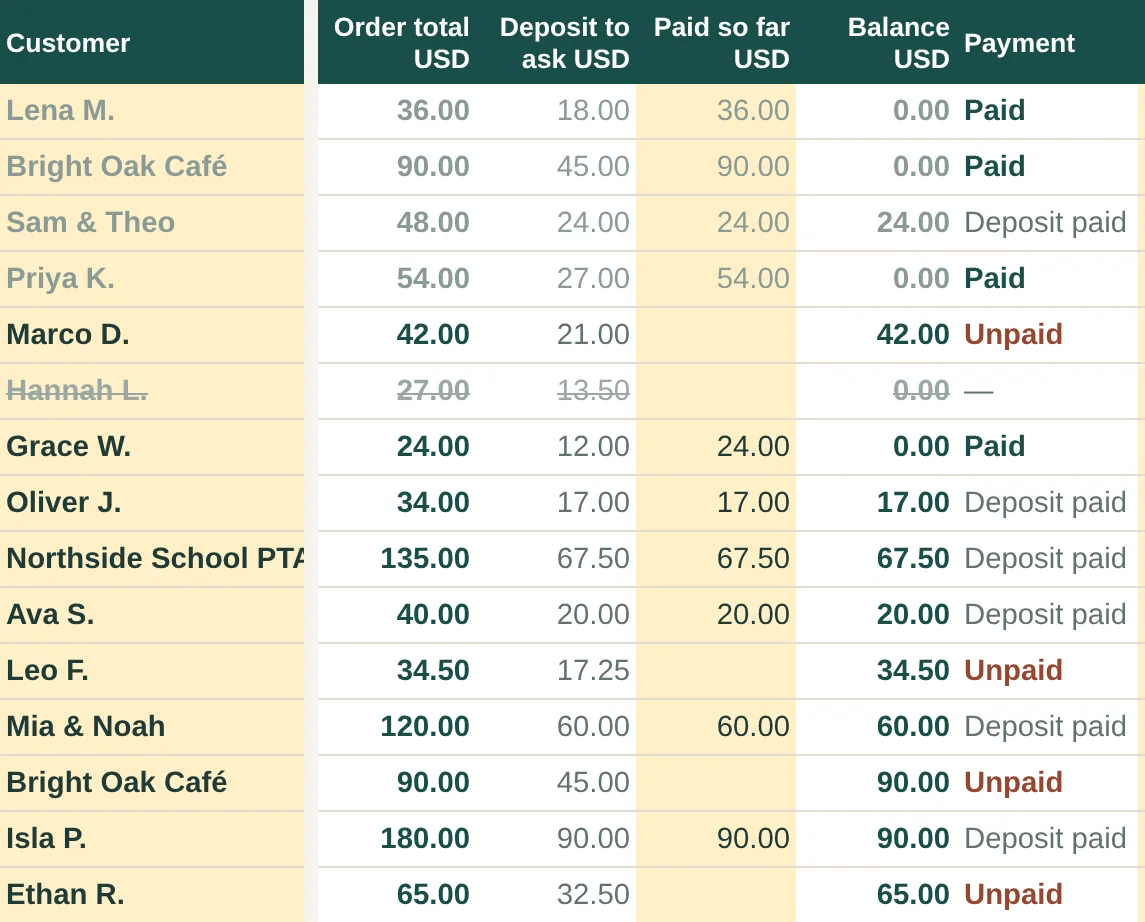
- Order total, deposit to ask, paid so far and balance.
- Order status: inquiry, confirmed, in progress, ready, completed or cancelled.
Deposits: how much and why
A deposit holds the date and covers your ingredients if an order is cancelled late. Choose a percentage, write it in your order policy and ask for it before you buy ingredients. Bakery Order Tracker suggests 50% by default, and you can set your own.
A worked example
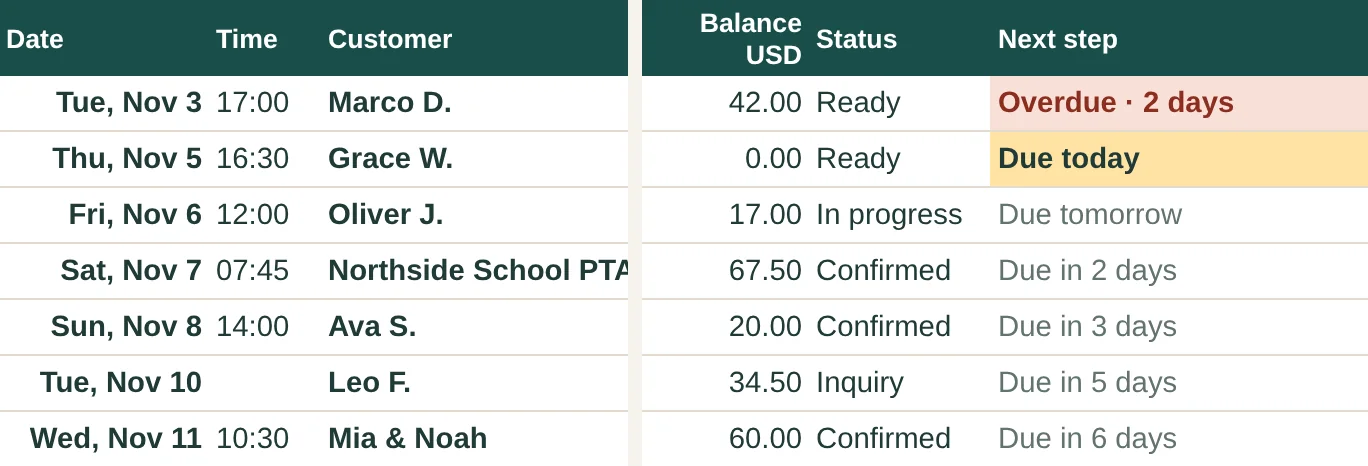
An order of 48.00 with a 50% deposit means 24.00 to ask. Once the customer pays it, the balance is 24.00 and the payment status reads "Deposit paid". If the order is marked completed while 24.00 is still open, it should stand out so you collect it, which is what the Next step column in Bakery Order Tracker does ("Completed · collect balance").
Payment statuses that keep you honest
- Unpaid: nothing received yet.
- Deposit paid: part paid, balance still open.
- Paid: nothing left to collect.
- Overpaid: more was received than the total, so check it.
- Check refund: a cancelled order with money received, so decide what to return according to your policy.
A 10-minute weekly routine
- Look at every open order due in the next 7 days, plus anything overdue.
- Confirm details that are missing, such as the pickup time or the flavor.
- Send a reminder for deposits that have not arrived.
- After each pickup, record the payment and mark the order completed.
Once a month
Add up the orders, the order value, what you collected and what is still to collect. It is the quickest way to see whether your busy weeks are also paying weeks.
Bakery Order Tracker
A Google Sheets order log with deposits, balances, payment statuses, a Next step column, an Upcoming tab and monthly totals. Instant download on Etsy for USD 3.50.
Questions
What if a customer cancels after paying a deposit?
That depends on the policy you shared before taking the order. Record the cancellation, so the order shows whether a refund needs checking.
Is a spreadsheet enough, or do I need an app?
If you take orders yourself by message or phone, a spreadsheet is usually enough. Ordering apps take orders and payments online; Bakery Order Tracker does not, and you enter each order by hand.
How do I decide the order total?
Work out your price first. The free cookie pricing calculator and Bakery Pricing Studio both give you a minimum price and a price for your target margin.